I’m kind of a person who secretly (well, not THAT secretly) wants to own a bunker. A bunker, solar panels, generators, ability to run off the grid, own mesh networks and a Starlink antenna. There’s something appealing in that idea, being independent and prepared, a male fantasy likely never coming to life.
For now I have to sublimate and replace it with something else, something tied to my passion towards technology, and building a homelab seems like a good beginning, so let the boy tell all about his toys.
Hardware
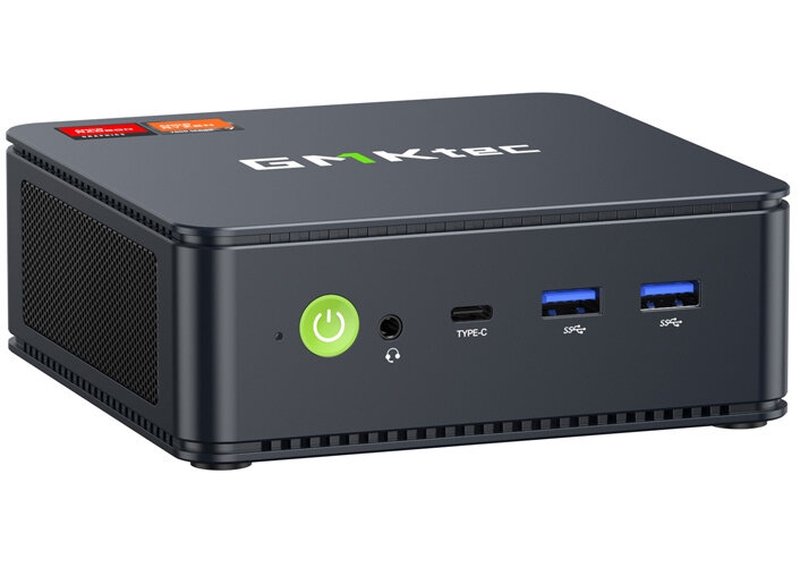
The initial homelab version resides on the OrangePI 5, a Chinese alternative to the Raspberry PI 5, with a bit more powerful CPU and a lower price tag. I’ve had some fun with it, but due to problems with the power-management and USB-attached storage I’ve decided to splurge a bit and buy a more robust NUC GMKTec (not-sponsored) device with 32Gb of RAM, 1 TB NVMe M2 storage with the ability to extend both RAM and disk due to two onboard M2 slots. It also has a more powerful CPU unit and in general behaved in a way more stable fashion across year.
On top of that I rent a Hetzner virtual machine to run services I want to have 24/7 uptime (homelabs, are, well, not that stable, at least in my environment with constant experimentation all around).
I don’t have any NAS set-up (yet), no disk racks, no NVM-e raids, a basic plain built-in disk storage. It’s definitely not the best set-up in terms of the data reliability (disks fail), but, in general, I have copies of my most important data sync with the Syncthing. Of course I salivate a bit on solutions like Ugreen NAS or Ubiquiti, but don’t quite feel it’s time yet. May be when I own my own house I’ll buy them, but right now I enjoy the process of tinkering more than actually getting a robust solution.
TLDR Overview
Principles
Principles is the big word. There are several things I wanted to follow alongside the journey, that dictated the tools choice, but still did not require me to spend TOO much time on tinkering.
Infrastructure-as-Code
I’d prefer as much configuration to be done automatically via scripts or the management platform (Ansible, Chef, Fabric), preferably stored as the codebase.
Reproducibility
If things go wrong or I decide to switch my working machine I’d like the infrastructure to be re-deployed and re-configured quickly. I would also like the things to be removed pretty quickly, so that if I tried out some service it does not leave a lot of mess behind.
Ease-of-use
It’s self-explanatory, for your hobby project you’d like things to go smooth and use more-or-less standard and familiar approaches.
OS
Old-fashioned, reliable swiss-army knife of the Debian distro. I originally intended to try out the NixOS for the sake of reproducible builds and being able to store the configuration in a single place but got too lazy about it. Another option could be running the Talos for k8s cluster but again, I did not really have any mood for managing k8s workloads on a single machine. May be somewhat in the future, with a bit more spare time…
The OS itself runs on the bare-metal, it does not use any hypervisor (e.g. ProxMox) because I could not elaborate the necessity for it.
Network Architecture
A common question when homelabing is how do I expose my network to the outside world? White IP-s are an option, but they cost money and may cause severe security implications, exposing your infrastructure to malicious actors if you’re not careful enough (I may easily not be). You may also use solution like Tailscale and magic funnels, but again, I’m too lazy and came up to the easiest solution possible: Cloudflare Tunnels, it’s like ngrok but better, and, what’s most important, totally free. No, seriously, I can’t imagine how Cloudflare manages to serve this traffic and support infrastructure with no buck coming out of it.
Cloudflare tunnel is a nice piece of tech, a single binary you run on your server. It creates an outbound-only connection to Cloudflare’s network - your firewall never needs to open any incoming ports. Once the tunnel is established, traffic flows bidirectionally through it.
Here’s the basic concept:
With the domain name tied to the Cloudflare DNS service you can create subdomains, mapped to specific ports and protocols on your machine (HTTP/HTTPS/TCP and a plethora of others).
Other two aspects of the networking stack is the reverse proxy and IdP / authentication management layer. Not all of the safehosted solutions provide a comfortable way to provide the access restriction policy, so the two following things provide us exactly that:
Traefik
Traefik is an open-source reverse proxy with a very flexible configuration approach, natively aware of Docker (which comes handy for the server automation, as you will see later on).
Authentik
Authentik is an IdP (Identity Provider) and SSO (Single Sign On) platform, with the ability to store configuration as blueprints, allowing us to adhere to the Infrastructure-as-the-Code approach.
Operations
Ansible
Ansible is my tool of choice for infrastructure automation, simply because I’ve been using it for years. It’s agentless (just needs SSH), uses YAML for configuration and has a lot examples on the internet. Each service on my servers is defined as a role - a self-contained unit with tasks, default variables, templates, and handlers.
It has a couple of drawbacks, it has an enormous documentation, DSL and structure of things is tedious, repetitive and results in a bunch of boilerplate, but it works and I’m used to it. Typical “role” (a description of the independent configuration to deploy will look the following way).
Each service follows this pattern: tasks define what to do, defaults provide sensible values, and templates generate configuration files with host-specific variables injected.
Overall set of steps for services is quite similar:
- Create shared resources (networks, volumes)
- Create proper schemas and users within the shared database (luckily lots of systems support Postgres out of the box)
- Render some configuration templates and place them on a target machine
- Pull a required version of the docker image
- Run the docker image with proper env variables, logging set-up and configuration options
- Provision authentication configuration if required, updating Authentik blueprint with info on application, provider and outpost
- Provision cloudflare tunnels if it is required to actually post the service to the big web.
Ansible roles are basically full of YAML DSL that looks a bit intimidating, but it’s very simple to follow most of the time:
- name: Run authentik server container
  ansible.builtin.docker_container:
    name: "{{ authentik_server_container_name }}"
    image: "{{ authentik_server_image }}"
    state: started
    restart_policy: unless-stopped
    command: server
    env_file: "{{ authentik_env_file_path }}"
    ports:
      - "{{ authentik_exposed_port }}:{{ authentik_port }}"
      - "{{ authentik_https_exposed_port }}:{{ authentik_https_port }}"
    networks: "{{ authentik_networks }}"
    volumes: "{{ authentik_volumes }}"
    labels: "{{ authentik_labels }}"
    log_driver: local
    log_options:
      max-size: "10m"
      max-file: "3"
I run deployments manually when I need to, no gitops integration yet, as I don’t feel need for it now.
SOPS
Secrets management is hard. There are many secrets that are generated for your infrastructure and at some moment you start feeling, that storing them in plain text may not be the best idea, may be you want to share your brilliant set-up with other folks via the github, what will you do?
You could use environment variables, separate .env files in .gitignore, or a password manager, but then you lose the “everything in Git” benefit. You could use Ansible Vault, but honestly, it’s quite clunky, encrypts entire files making diffs useless and has a bitter after-taste. I wanted something that:
- Encrypts only the values, keeping keys visible for diffs
- Works as seamless with Ansible as possible
- Doesn’t require a separate secrets server
- May enable secrets rotation that’s not a pain in the ass
Enter SOPS (Secrets OPerationS). It encrypts YAML/JSON values while keeping the structure readable, and it supports multiple backends including age - a simple, modern encryption tool that’s basically “what if we made encryption simple and didn’t use PGP?”
Here’s how it looks in practice. I have two types of files per host:
inventory/host_vars/
├── homelab.yaml       # Regular config (public)
└── homelab.sops.yaml  # Encrypted secrets
The .sops.yaml file looks like normal YAML, but values are encrypted:
postgres_password: ENC[AES256_GCM,data:xB7j...,tag:pL9...]
cloudflare_api_token: ENC[AES256_GCM,data:kM3n...,tag:qW8...]
authentik_secret_key: ENC[AES256_GCM,data:vN2m...,tag:rT5...]
The workflow is straightforward:
# One-time setup: generate an age key
age-keygen -o ~/.config/sops/age/keys.txt
# Edit encrypted file (decrypts in your $EDITOR, re-encrypts on save)
sops infra/inventory/host_vars/homelab.sops.yaml
# View decrypted content without editing
sops -d infra/inventory/host_vars/homelab.sops.yaml
# Ansible automatically decrypts during playbook runs
uv run ansible-playbook -i infra/inventory/main.yaml infra/playbook.yaml
The magic is in .sops.yaml config at the repo root, which tells SOPS which files to encrypt and which age public key to use:
  creation_rules:
    - path_regex: \.sops\.yaml$
      age: age1xxxxxxxxxxxxxxxxxxxxxxxxxxxxxxxxxxxxxxxxxxxxxxxxxx
When Ansible runs, it transparently decrypts variables from .sops.yaml files - I just reference them like any other variable: {{ postgres_password }}. No special modules, no extra flags, it just works because [Ansible supports SOPS] out of the box (https://docs.ansible.com/projects/ansible/latest/collections/community/sops/docsite/guide.html).
The best part? Git diffs are actually useful. When I change a password, only that encrypted value changes in the diff, not the entire file.
Is it perfect? No. You still need to securely share the age private key with team members (I don’t have team members, so problem solved, LOL). And if you lose the key, your secrets are gone (backups exist for a reason). But for a homelab where I’m the only operator and I want everything in Git, it’s exactly the right amount of complexity.
What’s actually running there?
Let’s talk about the actual workload. I’ve organized things by purpose rather than dumping an alphabetical list, because that’s how I think about them. I’d say this set-up is quite normal, that’s something you’ll see a lot comparing various people’s setups.
Media Management: The *arr Stack
This is probably what most homelabbers start with - automating media collection, for collecting and sharing the public domain content, of course:
- Prowlarr: The indexer manager. Point it at your favorite totally legal indexers, and it feeds search results to everything else.
- Radarr: Movie collection manager. You tell it what movies you want, it finds them, sends them to the download client, and organizes them after download.
- Lidarr: Same thing but for music. Integrates nicely with Navidrome.
- Bazarr: Because sometimes subtitles aren’t included, and watching anime without subs is challenging.
- Tidarr: Sometimes you want your Tidal records closer to you, with a bit of different UI and that’s exactly what this service can do for you.
- Transmission (port 9091): The actual BitTorrent client doing the downloading. All the *arr services send download requests here.
All of these are behind Authentik authentication because, well, I don’t want random people scheduling downloads on my machine. They share a common download directory
(/mnt/data/docker/transmission/downloads) and use PUID/PGID 1000 so that hardlinks work properly - this saves a ton of disk space by not duplicating files when moving from “downloads” to “media.”
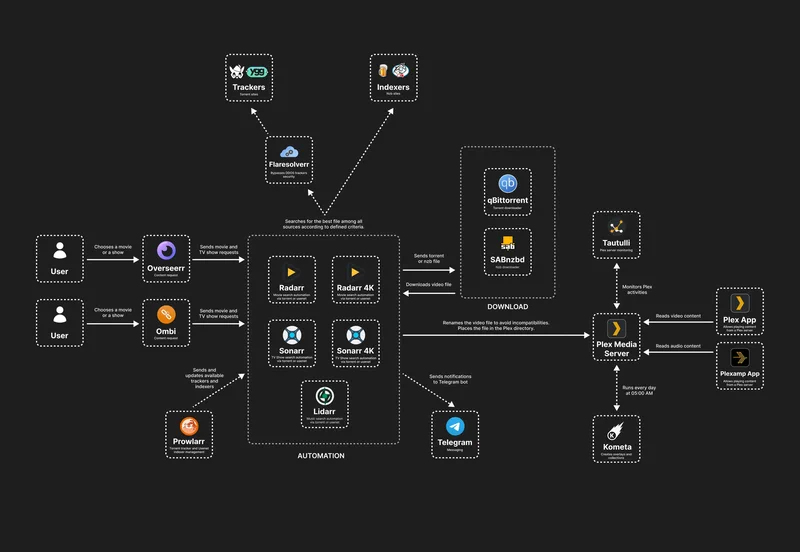
The workflow is: I get the desire to watch Cyrano de Bergerac, I add the movie to Radarr → Radarr searches via Prowlarr → finds it → tells Transmission to download → Transmission finishes → Radarr moves it to the media library
→ Jellyfin sees it.
Here’s the fellow redditor diagram showing possible set-up:
Media Consumption
Having media is useless if you can’t actually watch or listen to it:
Jellyfin: The core media server. Movies, TV shows, music - it’s like Plex but open source and without the “please sign in to our cloud service” nonsense. Has its own authentication, so it bypasses Authentik. Works great on pretty much every device, including my TV via the Android app.
Navidrome: Music streaming server with a Subsonic API, which means it works with a ton of mobile apps (I use DSub2000 on Android). Lidarr feeds music into its library folder, and it just works. Has its own authentication.
Calibre Web: E-book library manager and reader. I have a Calibre desktop application, running on my laptop to maintain the books collection. Its metadata database is synced via the
Syncthingto the Calibre-web volume and it exposes the OPDS API for multiple readers to fetch books.
AI and Chat
- LibreChat: My self-hosted AI chat interface. Think ChatGPT but you control the backend. It connects to multiple LLM providers (OpenAI, Anthropic, local Ollama) and has RAG (Retrieval Augmented Generation) support. This one is relatively heavy - it needs MongoDB for chat history, PostgreSQL with pgvector for embeddings, and MeiliSearch for full-text search. Optionally protected by Authentik, though it has its own auth too. I can’t really say I use it often, because I like the proximity of Claude Code more than any web-UI and I consider dropping it.
Photos and Files
Immich: Self-hosted Google Photos replacement. Automatic photo backup from my phone, face detection, album organization, EXIF metadata extraction. Has its own PostgreSQL database (with pgvector for face embeddings) and a machine learning container for image classification (working surprisingly well). Currently stores a few thousand photos. Can not but recommend it for your own deployment.
Syncthing: Keeps various folders synchronized between my laptop, phone, and servers. No cloud middleman, just direct P2P syncing. I use it to replicate Obsidian Vault, Documents and some other important dirs between multiple computers and Android devices.
MinIO: S3-compatible object storage. Useful when you need an S3 API for testing or when applications expect S3 storage.
Reading and Information
- Miniflux: Minimalistic RSS feed reader. I follow about 50 blogs and news sources. It’s fast, has keyboard shortcuts, and doesn’t try to be smart with algorithms - just chronological feeds. Built-in auth.
Infrastructure and Auth
These are the services that make everything else work:
Traefik: Reverse proxy that routes traffic to Docker containers based on hostnames. Docker-aware, so when I start a new container with the right labels, Traefik automatically picks it up. No manual config files to edit.
Authentik: SSO and identity provider. Protects sensitive services with ForwardAuth middleware - if you’re not logged in, you get redirected to the Authentik login page. Configuration is stored as blueprints (YAML files), so the entire auth setup is in Git.
PostgreSQL: Shared database server. Multiple services (Authentik, Miniflux, Immich, LibreChat) have their own databases on this instance instead of each running their own PostgreSQL container. Saves resources and makes backups easier.
Redis: Shared cache and session store, primarily used by Authentik and a few other services for session management and job queues.
Custom software
Highlight Exporter: My own Go service for processing and exporting book highlights from KOReader, Readwise, and Apple Books. Converts them to Obsidian-compatible markdown. This one is pretty niche but feel free to try-out.
Telegram Assistant: I run my own Telegram bot for various automation tasks, providing quick AI access in group chats and basically tinkering around with Telegram API. It’s the pet project I re-write the most to try out some new staff.
Chess-blunder trainer: The web-app I’ll release to opensource soon. Basically a wrapper around stockfish, where you can load all of your games from chess.com or lichess.com, make computer analyze them, select stupid moves by you and train them.
Monitoring
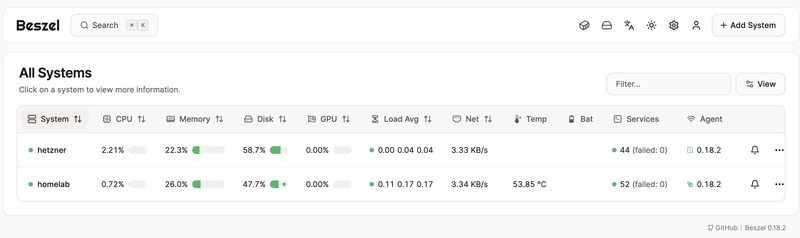
I want the monitoring to be easy to set up, easy to operate and having as many useful defaults as possible, I’m not interested in having an extremely detailed view of the system and not interested in the noise. I want to know the state of disks, CPU load, memory state and may be a state of services running on the machine.
Beszel
I’ve been spending some time looking for a monitoring solution that was easy to manage, configure, with good defaults. I’ve tried out the Grafana stack (OSS and the trial version of the cloud one), it felt bloated, complicated and just too much for a mere task of reporting basic OS stats from two machines. I’ve tried out Glances and a set of similar projects, but they felt, I don’t know, requiring tinkering too much.
Things have changed when I knew about the Beszel. It feels just so lightweight, easy to install and having the defaults that covers my needs for 120%, and I decided to stick with it. It’s simple and it does it’s job.
Statsping
For a finer level of monitoring for specific resources I went using the Statsping, basically a minimalistic service pinging endpoints you’ve defined and reporting latencies and availability, pinging you via different methods if some service is unavailable. It’s hosted on the cloud machine, to survive outages of the homelab and does not have any maintenance overhead on its own.
Things that are missing for now
Backups
Back-ups are important yet often neglected. That’s me, exactly, neglecting the back-ups entirely. I’m not that scared of losing the data like movies, music or photos. I’d like to have databases of respective services being properly backed-up, but I did not yet find neither the solution (restic?) nor the proper hardware set-up to make it reliable.
RAID set-up
Having a single M2 NVMe drive for media data and system may seems like a disaster recipe for a seasoned system administrator and it is. Yet, I’m fine with that, I don’t have enough spare space for a NAS server or a separate backup machine.
Cloud independency
I rely heavily upon cloudflare tunnels infrastructure for the resources availability. If cloudflare goes down my infrastructure access goes down. I’m fine with that now, but in future would invest in some alternatives.
Full IaC and automation
I don’t have CI pipelines or something that fancy to automatically provision infrastructure changes. I run ansible playbooks manually and for me it’s easy and comfortable, I don’t feel like moving to GitOps direction would greatly improve my life.
Conclusion
Cost-efficiency
I pay around 7 euro a month for the Hetzner virtual machine and I don’t know what’s the contribution of the homeserver box my electricity bill, but I assume its footprint is very small. Adding a new service to the stack or fixing some configuration takes very little time (I’d say around 20-30 minutes), as it’s easily outsourced by the Claude Code and only requires a brief review before the deployment. Total time spent on the whole project is very difficult to estimate as it spans across multiple years, projects and hardware items, but I’d say it’s around 100-150 hours total.
Reflection
There’s no bunker in the end, it’s very far from the off-the-grid independence, but for me it’s a solid middle ground between self-sufficiency and pragmatism. The infrastructure works, it’s stable enough for my tinkering habits, and most importantly, it’s mine. Minimal vendor lock-in, no surprise ToS changes, no algorithmic feed deciding what I should read, no sudden “We’ve got acquired by X and now all your stuff is gone” bonkers.
Is it perfect? Absolutely not. I’m missing lots of things. But perfection isn’t the goal - understanding how things work is and a having a bit of joy is. Every service I deploy, every Ansible role I write, every secret I encrypt teaches me something. That’s the real value.
If you’re considering building your own homelab, start small, don’t overthink it, and remember: the goal isn’t to have the most impressive hardware or the longest list of services. It’s to own your data, understand your infrastructure, and enjoy the process of tinkering. Everything else is just implementation details.
Now, back to plotting that bunker setup…